Time in Forecasts
Weather forecasts are organized around time concepts that determine when a model ran, what data it used, and what future moments it predicts. All times are in UTC, often written with a "z" suffix (e.g. 18z = 18:00 UTC).
Key Concepts
| Term | Definition |
|---|---|
| Initialization time | The reference time that identifies a specific model run. For example, "the 12z ECMWF run" means the run initialized at 12:00 UTC. See the Initialization Times Endpoint. |
| Forecast zero time | The starting clock for a forecast's time axis. In traditional models, forecast zero equals the initialization time. In WeatherMesh, multiple runs can share the same forecast zero (see below). |
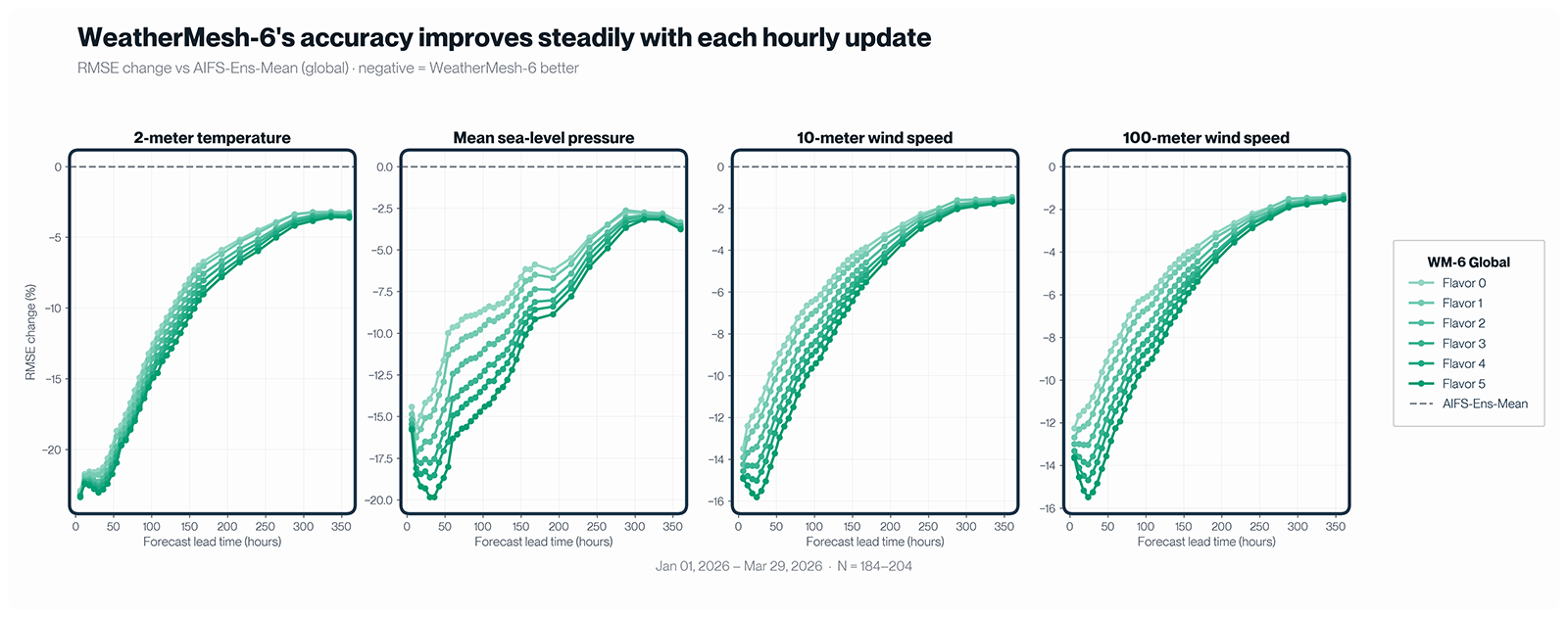
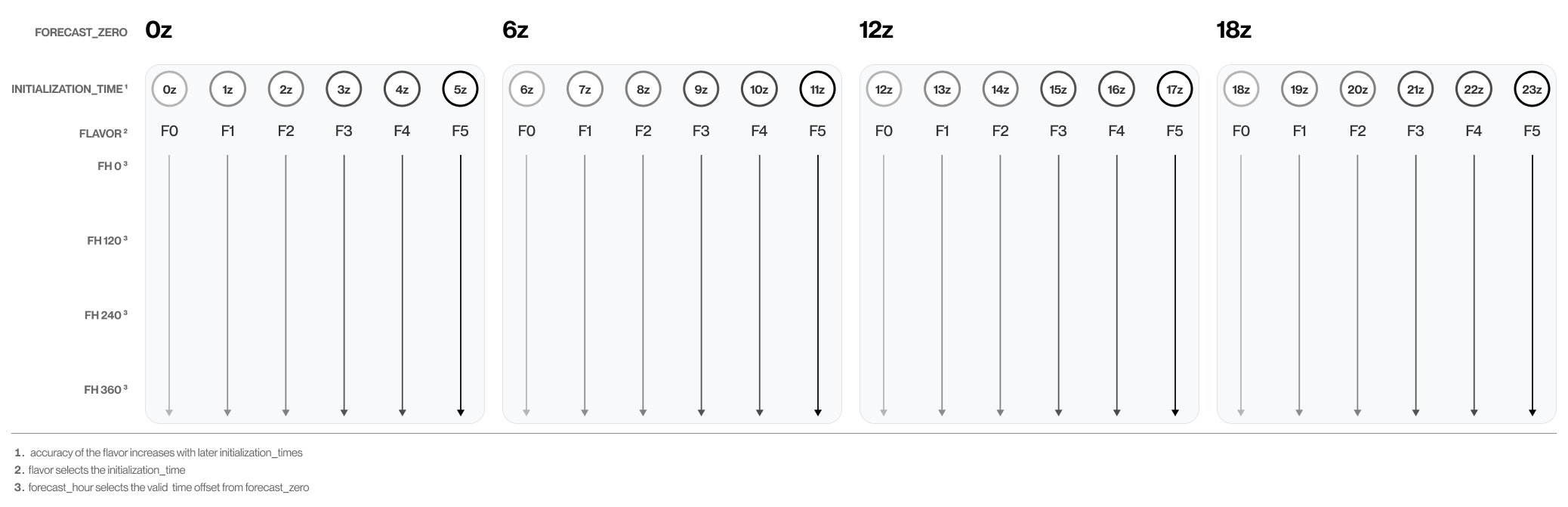
| Flavor | The initialization-time offset from a shared forecast zero. For hourly WM-6 runs, Flavor 0 initializes at forecast zero, Flavor 1 initializes one hour later, and so on through Flavor 5. Later flavors use more recently available observations. This differs from forecast hour, which is the offset from forecast zero to the predicted valid time. |
| Valid time | The future moment a forecast describes. If a forecast is valid at 18:00 UTC next Tuesday, it represents the predicted weather at that exact moment. |
| Forecast hour | The offset between forecast zero and valid time. Simply: valid time = forecast zero + forecast hour. |
| Generation time | When a forecast run finishes computing and becomes available for download. |
| Data assimilation | The process of combining recent atmospheric observations into an initial state. The model then propagates that state forward to produce predictions. |
Traditional Forecasting
Traditional models like ECMWF run on a fixed schedule (4 times per day at 0z, 6z, 12z, 18z). Each run assimilates observations from a 6-hour window centered on its initialization time. For example, the 0z run uses data from 21z the previous day to 03z.
The forecasting process starts after the assimilation window closes and takes several hours to complete. The 0z ECMWF run typically becomes available around 05:40z, nearly six hours after its initialization time.
Continuous Forecasting (WeatherMesh)
WeatherMesh runs continuously, allowing each new forecast to incorporate more recent observations. This is a fundamental difference from traditional models that run on fixed schedules and can lag hours behind real time.
| Property | ECMWF | WeatherMesh |
|---|---|---|
| Run frequency | 4 per day (0z, 6z, 12z, 18z) | Up to every 15 minutes |
| Forecast zeros | Same as initialization times | Every 6 hours (0z, 6z, 12z, 18z) |
| Data freshness | ~6 hours behind initialization time | 20 to 40 minutes behind real time |
Multiple WeatherMesh runs can share the same forecast zero. For example, runs initialized at 12:00 and 12:15 can both use a forecast zero of 12:00. For system timing details, see Run Information.
A flavor identifies which initialization time was used within a forecast-zero window. The flavor number is the initialization's offset from forecast zero. For example, in an hourly sequence with a 12z forecast zero, the 12z initialization is Flavor 0 and the 17z initialization is Flavor 5.
| Forecast zero | Flavors 0–5 |
|---|---|
| 00z | 00z init → 05z init |
| 06z | 06z init → 11z init |
| 12z | 12z init → 17z init |
| 18z | 18z init → 23z init |
Later flavors incorporate observations available later in the window and are generally more accurate.